

Managing users and authentication are some of the most important administration tasks of managing MongoDB servers. You must ensure that the server is configured to be able to properly identify your users and applications and deny connections or operations that are unable to authenticate correctly.To manage these requirements,You must able to decide which users your server requires and create those accounts.
In this guide, we will walk through how to create, view, and remove user accounts. We will go over how to set up authentication for your accounts and how to update the credentials when you need to change your user passwords.
1) db.createUser()
The db.createUser() method is used for creating a new user for the database.If the user already exists in the database, this method will return a duplicate user error.
Syntax
db.createUser(user,writeConcern) Create user with roles
The following operation creates a Testuser on the sample database and gives the user readWrite role.
use sample
db.createUser(
{
 user: "User_name",
 pwd: passwordPrompt(),
roles: ["readwrite"]
}
)

Note
passwordPrompt() : The function in MongoDB is used to securely input a password when creating or managing users.It displays the entered password in plaintext.MongoDB’s shell (such as mongosh) does not mask the password as you type it.
readWrite : This is the one of the database user role in the mongodb.It provides all the privileges of the read role plus ability to modify data on all non-system collections and the system.js collection.
Create user without roles
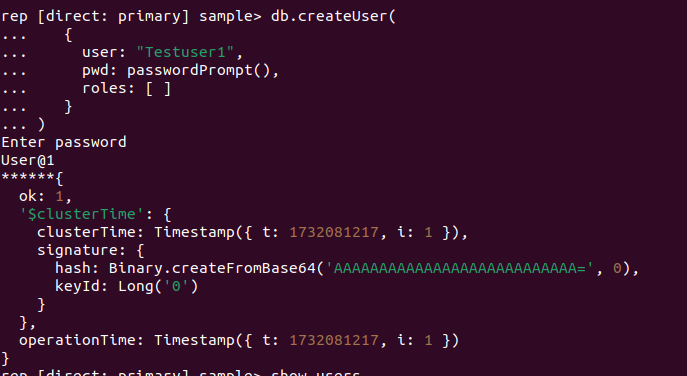
Create a MongoDB user without assigning any roles, the user has no privileges by default. This means the user cannot perform any operations on the database, including reading data, writing data, or performing administrative tasks.
Creates a new user, Testuser1, in the sample database and has not assigned any roles.
Use sample
db.createUser(
{
user: "User_name",
pwd: passwordPrompt(),
roles: []
}
)
Create an administrative user with roles
The following example creates a Testapp user in the admin database and assigns the readWrite role for the config database.
 use admin
db.createUser(
{
user: "User_name",
pwd: passwordPrompt(),
roles: [
{role:"readWrite",db:"DB_name"}
]
}
)
Create User with Authentication Restrictions
The following operation creates a user named TestUser in the admin database.This user may only authenticate if connecting from IP address 192.168.29.60 to IP address 198.51.100.0.
db.createUser(
   {
     user: "User_name",
     pwd: passwordPrompt(),
     roles: [ { role: "readWrite", db: "DB_name" } ],
     authenticationRestrictions: [ {
        clientSource: ["192.168.29.60"],
        serverAddress: ["198.51.100.0"]
     } ]
   }
)

Create user with multiple database access
The following operation creates a new user named multidbUser in the admin database and assigns readWrite role for the demo database and read role for the sample database.
use admin
db.createUser({
    user: "User_name",
    pwd: "Password",
    roles: [
        { role: "readWrite", db: "DB_name1" },
        { role: "read", db: "DB_name2" }
         ]
 })
2) db.auth()
The db.auth() method allows a user to authenticate to the database from within the shell.Once authenticated, the user can perform operations on the database based on their assigned roles and privileges.It is useful when you’re already connected to a MongoDB instance and want to authenticate as a different user without starting a new session.
Syntax
db.auth(<username>,<password>)We have to choose any of the following methods to authenticate the user.
- To omit the passwordPrompt
Syntax
db.auth(<username>)Example
db.auth('User_name')
2. Use the PasswordPrompt() method
Syntax
db.auth(<username>,<passwordPrompt()>)Example
db.auth('User_name',passwordPrompt())
3.To specify a cleartext password
Syntax
db.auth(<username>,<password>)Example
db.auth('User_name','Password')
3) db.getUser()
The db.getUser() method returns user information for a specified user on a specified database. If the user doesn’t exist in the database returns null value.
Syntax
db.getUser(username,args)Example
To check the Testuser1 user information from the sample database.
use sample
db.getUser('User_name')
To check the Testuser1 user information with credentials
db.getUser('User_name',{showCredentials:1})
4) db.getUsers()
The db.getUsers() method returns information of all users in the database.
Syntax
db.getUsers(<options>)Example
To view all user information in a sample database
db.getUsers()
To view all user information with credentials
db.getUsers({showCredentials:1})
To view all user information with a specified filter condition
db.getUsers({ filter: { mechanisms: "SCRAM-SHA-256" } })
5) db.grantRolesToUser()
The db.grantRolesToUser() method is used to grant additional roles to a user.
Syntax
db.grantRolesToUser( "<username>", [ <roles> ], { <writeConcern> })Example
Grants read Write role to the user Testuser1 on sample database.
db.grantRolesToUser("User_name", [{role:"readWrite",db:"sample"}])
6) db.revokeRolesFromUser ()
The db.revokeRolesFromUser() removes one or more roles from a user on the current database.
Syntax
db.revokeRolesFromUser( "<username>", [ <roles> ], { <writeConcern> })Example
Removes the Testuser1 user readwrite role from the sample database.
db.revokeRolesFromUser("User_name", [{role:'readWrite', db:'sample'}])
7) db.updateUser()
The db.updateUser() method is used to update the user profile on the database.
Syntax
db.updateUser(username,update,writeConcern)Example
To update the user Testuser1 password.
db.updateUser("User_name",{pwd:"Use@1"})
8) db.dropUser()
The db.dropUser() method is used to remove the user from the current database.
Syntax
db.dropUser(username,writeConcern)Example
To remove the user Testuser1 from the sample database.
db.dropUser("User_name")
9) db.dropAllUsers()
The db.dropAllUsers() method is used to remove all users from the current database.
Syntax
db.dropAllUsers(writeConcern)Example
To remove all users from the database sample.
db.dropAllUsers()
Conclusion
Effective user management is essential for maintaining a secure and well-structured MongoDB environment. The methods used to manage users play a crucial role when working on MongoDB servers, especially when handling multiple servers across diverse environments. Proper user management ensures controlled access, safeguards data, and supports seamless operations.Throughout this blog, we’ve explored various methods for managing users in MongoDB, highlighting their flexibility and scalability.I hope that it’s very useful for the beginners handling users on MongoDB. Stay tuned for more blogs.
Trackbacks/Pingbacks